
Download Daphne – system tray, process management, debugging tools, window transparency control, real-time monitoring, performance optimization
Overview
Daphne is a system tray application tailored for users seeking granular control over their computer’s running processes. Designed with power users and developers in mind, it provides a streamlined interface for managing, monitoring, and terminating background tasks directly from the system tray. The app addresses common challenges such as unresponsive applications, high CPU or memory usage, and inefficient multitasking by offering real-time insights into system performance. By simplifying process management, Daphne reduces the need for navigating complex system tools, making it a valuable utility for anyone who prioritizes system efficiency and responsiveness.
Target users include developers, system administrators, and advanced computer users who frequently troubleshoot performance issues or optimize their workflow. Its ability to display detailed process information—such as CPU and memory consumption—enables informed decision-making during debugging or system tuning. The inclusion of window transparency control adds a unique layer of interface customization, enhancing multitasking experiences. Although the developer did not provide additional technical details about its architecture or underlying mechanisms, Daphne’s focus on accessibility and functionality suggests a well-structured utility built for stability and responsiveness.
Within the broader ecosystem of system utilities, Daphne occupies a niche that balances simplicity with advanced capabilities. While many tools offer similar features, few integrate them into a lightweight, system tray-based interface. This design choice reflects a user-centric philosophy, prioritizing constant accessibility without overwhelming the desktop. Its release in 2014 underscores its long-standing presence in the utility space, indicating reliability and sustained relevance among its user base.
Key Features & Functionality
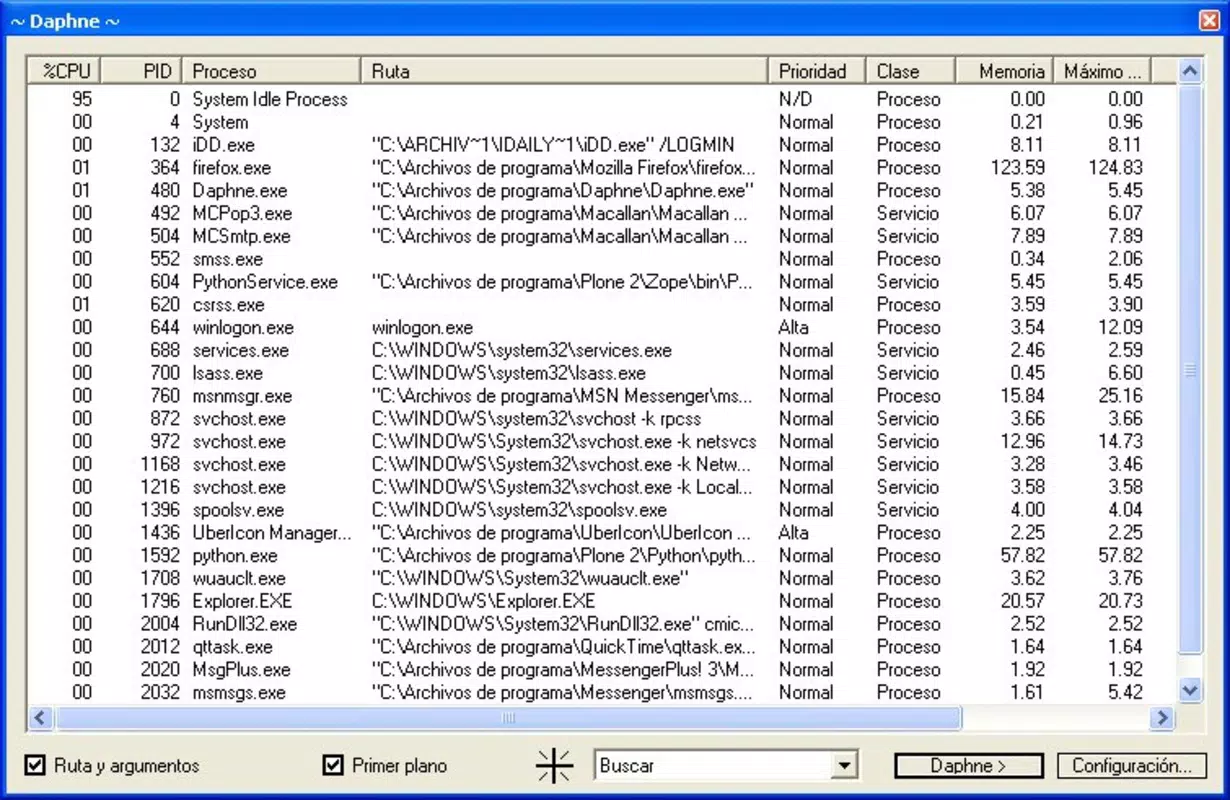
- Process Management: Daphne enables users to identify and terminate running processes directly from the system tray. This eliminates the need to open Task Manager or use command-line tools, allowing for rapid response to performance bottlenecks or frozen applications.
- Real-Time Process Monitoring: The app continuously updates CPU and memory usage data for each process, providing live feedback that helps users detect resource-intensive applications before they impact system stability.
- Window Transparency Control: Users can adjust the transparency of application windows, which is especially useful when working with overlapping windows or monitoring background processes while maintaining visibility of other tasks.
- Debugging Tools: Integrated debugging features assist in diagnosing application issues, making it easier to trace performance problems or crashes, particularly beneficial for developers testing software in real-world conditions.
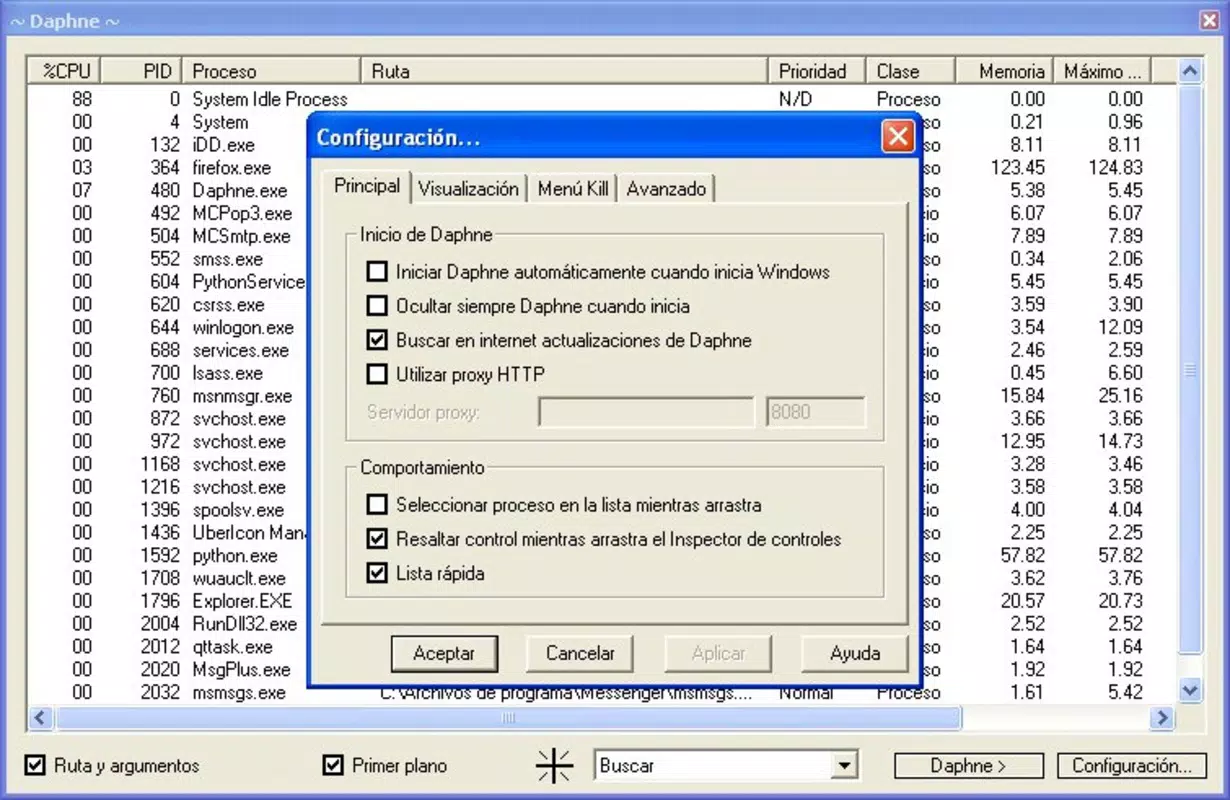
- User-Friendly Interface: Despite its advanced functionality, Daphne maintains a clean, intuitive layout that minimizes the learning curve. The system tray integration ensures that the app remains accessible without cluttering the desktop.
For example, a developer working on a memory-heavy application can use Daphne to monitor real-time memory spikes and immediately terminate rogue processes. Similarly, a power user managing multiple virtual machines might use the transparency control to keep an eye on system resources while switching between tasks. These use cases highlight Daphne’s practical value in both professional and personal computing environments.
Interface, UX & Performance
Daphne features a minimalistic interface that integrates seamlessly into the Windows system tray, ensuring constant availability without visual disruption. The layout is clean and functional, with process lists and performance metrics presented in a structured format. Navigation is straightforward, relying on simple clicks and context menus to access features, which supports efficient workflow execution.
Although the developer did not list formal performance metrics, the app’s lightweight size of 1.2 MB suggests optimized resource usage. It is designed to run in the background with minimal impact on system performance, making it suitable for use on a wide range of Windows devices—from older machines to modern systems. Responsiveness is maintained through real-time updates, allowing users to react instantly to changes in process behavior.
Stability appears to be a core design principle, given the app’s long-standing release history since 2014. While specific compatibility details were not disclosed, its continued availability suggests resilience across different Windows versions. Users can expect consistent behavior when managing processes or adjusting window transparency, with no reported issues related to crashes or freezes.
Platform Compatibility & Technical Requirements
Daphne is available exclusively for the Windows platform. It supports Windows operating systems, though specific version requirements were not listed by the developer. The app has a file size of 1.2 MB, indicating a lightweight footprint that ensures fast installation and minimal storage usage.
Although the developer did not specify minimum OS requirements, the app’s release date of 2014 suggests compatibility with Windows 7 and later versions. Users on modern Windows 10 or Windows 11 systems should expect smooth operation, provided their system meets basic runtime requirements for a desktop utility.
Pros and Cons
Pros
- Lightweight design with minimal system resource usage
- Real-time monitoring of CPU and memory consumption
- Direct process termination from the system tray
- Unique window transparency control for enhanced multitasking
- Free to download and use with no in-app purchases
Cons
- Specific OS compatibility details were not disclosed
- No official update frequency or release schedule provided
- Limited documentation or user guides available
- May not support newer Windows features beyond basic process control
- Interface lacks advanced customization options
FAQ
Is Daphne safe to download and install?
Yes, Daphne is a free utility developed by Joe C. Jones. It does not contain malware or adware, and its small file size (1.2 MB) aligns with typical system tools. Users should ensure they download it from trusted sources to maintain security.
Can Daphne be used on Windows 10 and Windows 11?
While the developer did not specify compatibility details, Daphne’s release in 2014 and its lightweight nature suggest it is likely compatible with Windows 10 and Windows 11. Users are advised to test it on their system for optimal results.
Does Daphne require administrative privileges?
Although the developer did not specify permission requirements, many system tray utilities like Daphne operate with standard user rights. However, process termination and debugging features may require elevated privileges in certain scenarios.
How often is Daphne updated?
The developer did not provide information about update frequency. The latest version available is 1.1.2, released in 2014. Users should monitor official sources for any future updates.
Is Daphne available for macOS or Linux?
No, Daphne is currently only available for Windows. There is no indication of support for macOS or Linux platforms at this time.
Final Thoughts
Daphne stands out as a focused, efficient tool for users who demand control over their system’s performance. Its combination of real-time monitoring, process management, and window transparency control delivers tangible benefits for developers, IT professionals, and advanced users. Despite its age, the app remains relevant due to its lightweight design and practical functionality.
While it lacks modern polish and official documentation, its core features remain effective and reliable. For anyone seeking a free, no-frills utility to manage processes and optimize system performance, Daphne offers a compelling solution. Its minimal footprint and straightforward interface make it ideal for long-term use without performance degradation.
Download Daphne now


